






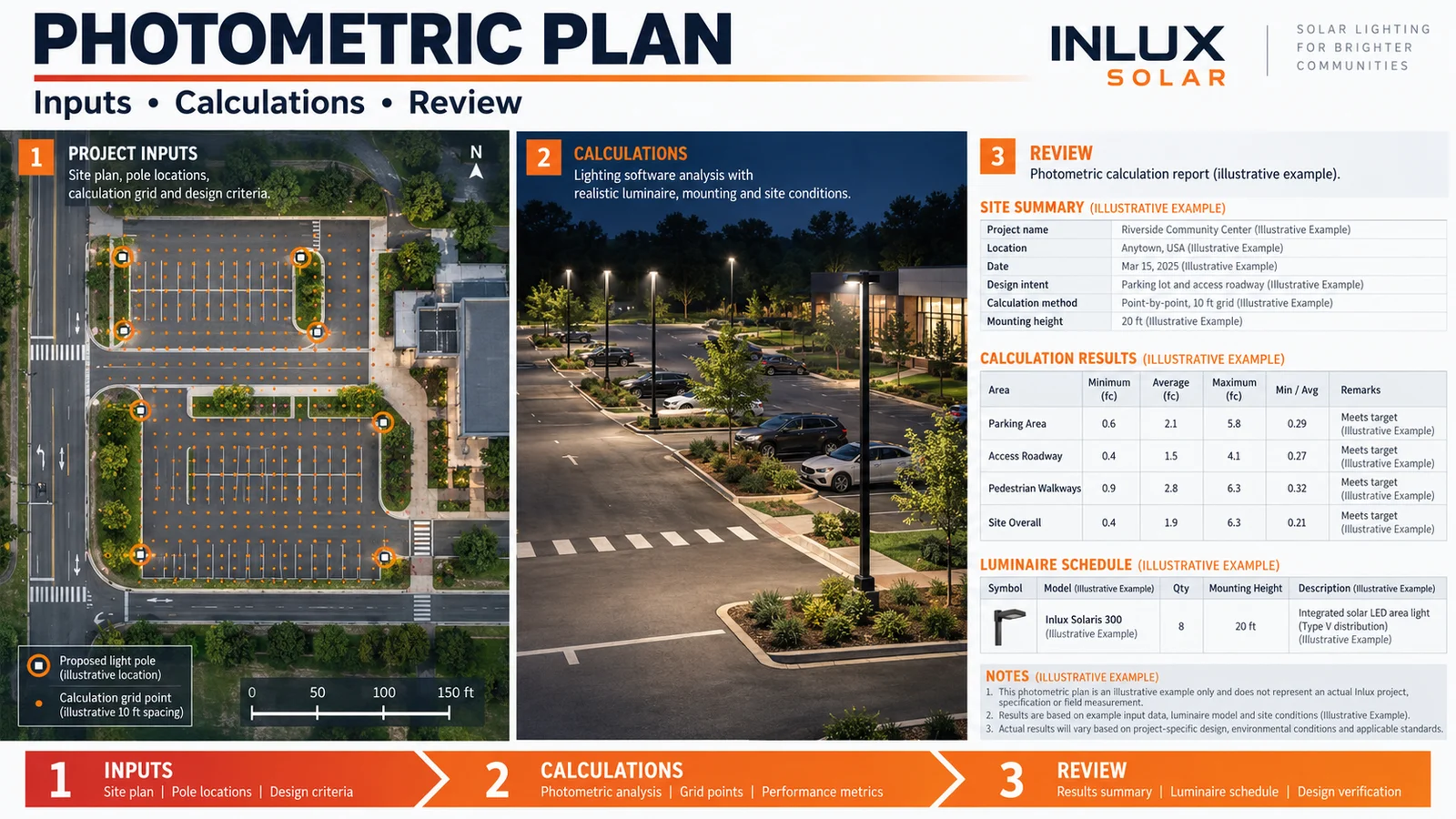
Resposta rápida: A photometric plan is a site-specific lighting calculation. It combines a scaled layout, exact luminaire photometric files, mounting details, calculation grids, operating assumptions and project criteria to predict where light will fall. A useful plan reports more than average lux or foot-candles: it also shows minimums, maximums, uniformity, glare or spill checks, fixture schedule and the assumptions needed to reproduce the result.
The word plan is important. An IES or LDT file describes one luminaire’s tested light distribution; a photometric plan applies that file to a real road, car park, yard, walkway or perimeter. It is a decision document used before procurement and installation—not a promise that any lamp with the same wattage will produce the same result.
What is a photometric plan?
A photometric plan is the calculation package that connects a lighting requirement to a proposed physical layout. The model normally includes site geometry, pole locations, mounting heights, arm lengths, fixture orientations, surface or road assumptions and one exact photometric file for every luminaire configuration. It then calculates lighting values on defined points, grids or observer positions.
Suppliers may call the document a photometric layout, lighting study or calculation report. Ask for a sample before comparing quotes: one supplier may mean a simple illuminance plot, while another includes glare calculations, boundary checks and a complete fixture schedule. Agree on the deliverables, calculation criteria and revision process before work starts.
A good plan should let a reviewer answer five questions quickly:
- Which site and revision does this model represent?
- Which exact luminaires, optics, watts and settings were modelled?
- Which criteria and calculation surfaces were used?
- Where do the minimum, average and maximum values occur?
- Can the proposed equipment and installation reproduce the model?
Our separate guide explains the underlying photometry terms and units. This page focuses on the site plan, its inputs, outputs and approval checks.
What a photometric plan is not
A coloured heat map by itself is not a complete plan. Neither is a catalog lumen value, a wattage table, a generic pole-spacing rule or an IES polar plot. Each can be useful, but none connects all the variables on a specific site.
| Item | What it can establish | What it cannot establish alone |
|---|---|---|
| Product datasheet | Rated configuration, electrical and mechanical data | Light levels across the proposed site |
| LM-79 report | Measured luminaire performance under stated test conditions | Performance at a particular pole spacing and site geometry |
| IES/LDT file | Angular light distribution for a tested configuration | Whether the proposed layout meets project criteria |
| Rendering | How a designer wants the scene to appear | Auditable lux, luminance, uniformity or glare results |
| Photometric plan | Calculated performance for stated inputs | Final installed performance if products or field conditions differ |
| Field measurements | Performance at measured points under recorded conditions | What the design would do under every weather and operating condition |
The U.S. Department of Energy’s current metrics and test methods page lists ANSI/IES LM-79-2019 as the approved method for optical and electrical measurements of solid-state lighting products. A laboratory report describes the tested product; this is why the report, photometric file and project plan must reference the same model and configuration.
Inputs required before calculation begins
Most weak studies fail before the software opens. If dimensions, target criteria or fixture settings are guessed, the output only documents those guesses more attractively.
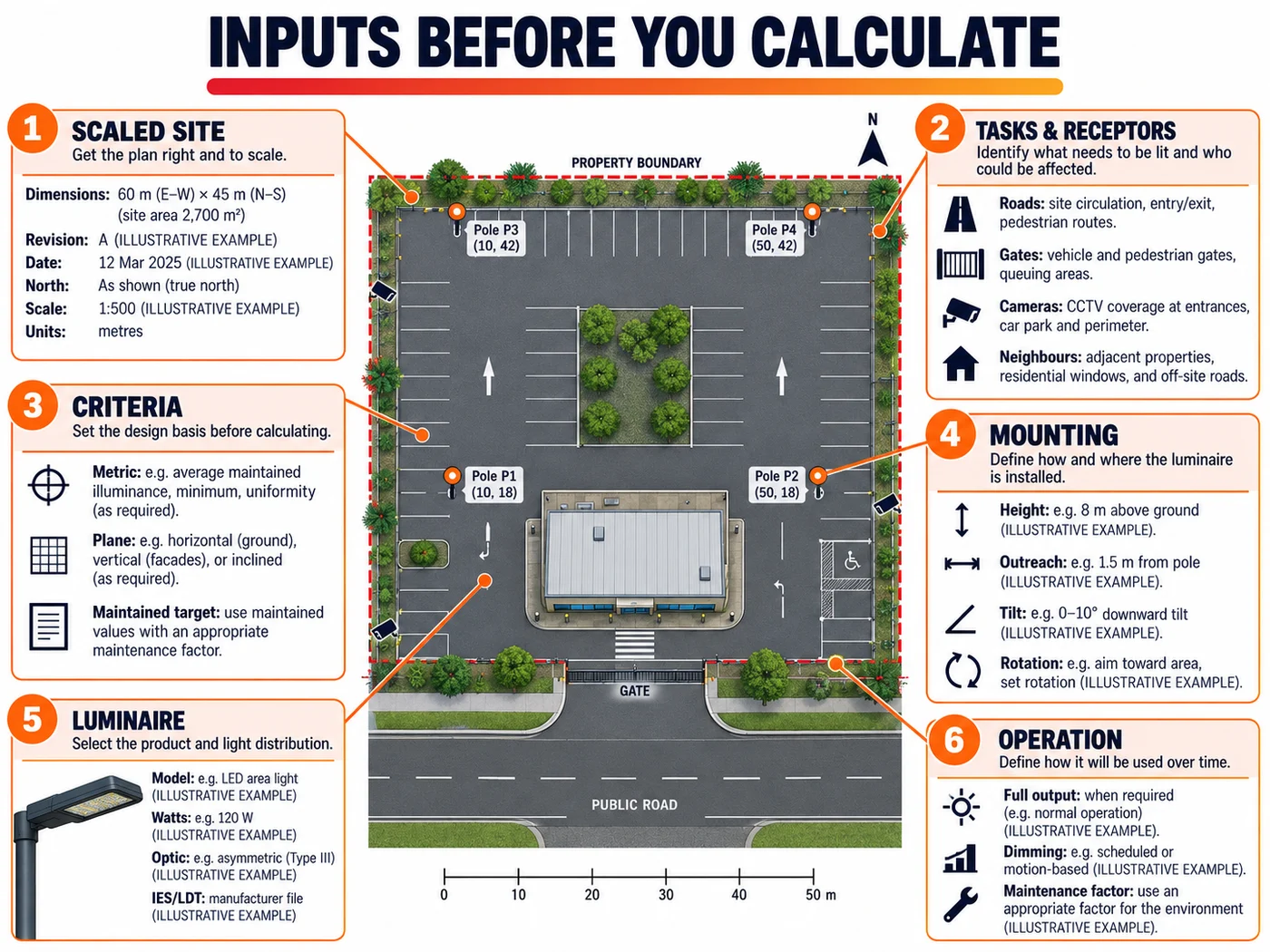
1. A scaled site file and revision
Provide a dimensioned PDF, DWG, DXF or reliable coordinate set. Mark the drawing revision, north direction, property boundary, road and path widths, parking bays, buildings, gates, trees and other permanent obstructions. A screenshot without a scale is unsuitable for final design.
2. The visual task and sensitive receptors
Name what people must see: lane edges, pedestrians, loading activity, faces at a gate, obstacles, signs or camera targets. Also mark homes, windows, ecological areas, airfields, water edges and adjoining properties where spill or glare may be restricted. A road calculation grid cannot answer a vertical security-camera question unless a vertical plane is modelled.
3. Project criteria
State the applicable authority, tender clause or project rule. Record whether each criterion is initial or maintained and identify the metric precisely. “Uniformity 3:1” is ambiguous unless it says average-to-minimum or maximum-to-minimum. “20 lux” is incomplete without the surface, grid, operating mode and acceptance condition.
For road projects, the CIE 140:2019 road-lighting calculation report documents calculation methods for road-lighting quality criteria. Local authorities and contracts may use different standards or limits, so the design basis must be written into the report instead of assumed.
4. Pole and mounting constraints
Record proposed or existing pole coordinates, mounting height above the calculation surface, outreach, setback, tilt, rotation and any permitted alternatives. A one-metre height change or a rotated asymmetric optic can materially change the grid.
5. Exact luminaire configuration
The schedule should identify manufacturer, model, LED package or lumen package where applicable, input watts, optic code, CCT, driver setting, shield and the IES/LDT filename and date. “100 W LED street light” is not a reproducible model definition. Our IES file review guide shows how to check identity, output, distribution and suspicious file mismatches.
6. Operating and maintenance assumptions
Show full-output and dimmed scenes separately when controls are used. State the maintenance factor rather than quietly reducing or inflating the results. For solar lighting, a photometric plan confirms optical performance at each output state, while a separate battery-sizing calculation confirms whether the system can sustain that schedule through the design night and worst-month solar conditions.
What should the report contain?
A reviewable package usually contains seven groups of information. A shorter report can still be valid, but missing traceability should be resolved before approval.
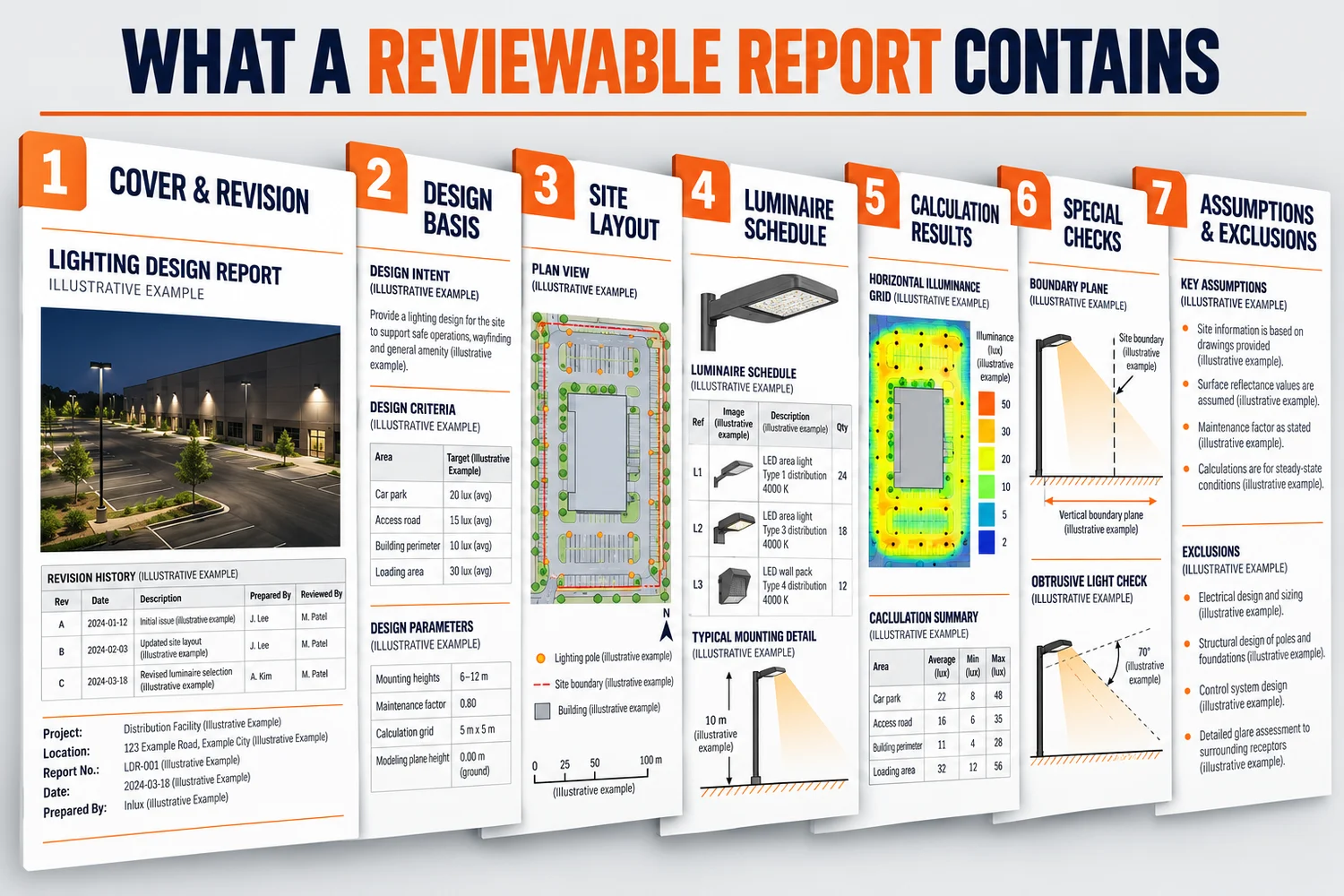
| Report section | Minimum useful content | Reviewer question |
|---|---|---|
| Cover and revision | Site, client, location, drawing revision, report revision, author and date | Am I reviewing the current scheme? |
| Design basis | Criteria, standard or tender source, maintenance basis and operating scenes | What does pass or fail mean? |
| Site layout | Scale, north, boundary, calculation areas, poles, luminaires and aiming | Does the model match the site? |
| Luminaire schedule | Exact model, watts, optic, CCT, output setting, quantity and file identity | Can procurement buy the modelled configuration? |
| Calculation results | Grid height and spacing, minimum, average, maximum and defined uniformity ratios | Are dark spots hidden by the average? |
| Special checks | Vertical planes, luminance, glare, boundary spill, obtrusive light or emergency scenes as applicable | Were the actual risks tested? |
| Assumptions and exclusions | Surface data, maintenance factor, obstructions, tolerances and unmodelled conditions | Where could reality differ? |
Software capability does not remove the need for review. DIAL states in its current DIALux FAQ that DIALux can calculate indoor and outdoor areas, parking spaces and road lighting, use standard IES and LDT files, verify standards and document the results. The accuracy of a particular project still depends on the inputs, photometric data and selected criteria.
How to read the calculation grid
Start with the grid definition before looking at the colours. Confirm the calculation plane, height, boundary and point spacing. Then read the minimum, average and maximum together.
- Average illuminance describes the arithmetic mean across the reported points. It can look acceptable while dark locations remain.
- Minimum illuminance identifies the weakest point on that grid. Confirm that the point is inside the relevant task area and not removed by a convenient boundary edit.
- Maximum illuminance helps reveal hot spots, excessive contrast or a grid located too close to a luminaire.
- Average-to-minimum uniformity is calculated as average divided by minimum when written as a ratio such as 3:1. Some standards use minimum divided by average instead. The report must state the convention.
- Maximum-to-minimum uniformity is a different ratio and normally produces a larger number. Do not compare it with an average-to-minimum limit.
A simple arithmetic check
Suppose a clearly marked calculation area reports:
- average: 18 lux
- minimum: 6 lux
- maximum: 35 lux
Average-to-minimum uniformity is 18 ÷ 6 = 3.0, written as 3.0:1. Maximum-to-minimum is 35 ÷ 6 = 5.83, written as 5.83:1. The same grid therefore has two valid but different uniformity figures. A report that prints only “uniformity 3.0” without the formula is not ready for contractual acceptance.
This example is instructional, not an Inlux project result or a recommended universal target. Confirm the required metric and limit for the specific site.
Maintained values, glare, vertical light and spill
Average horizontal lux is often only one part of the decision.
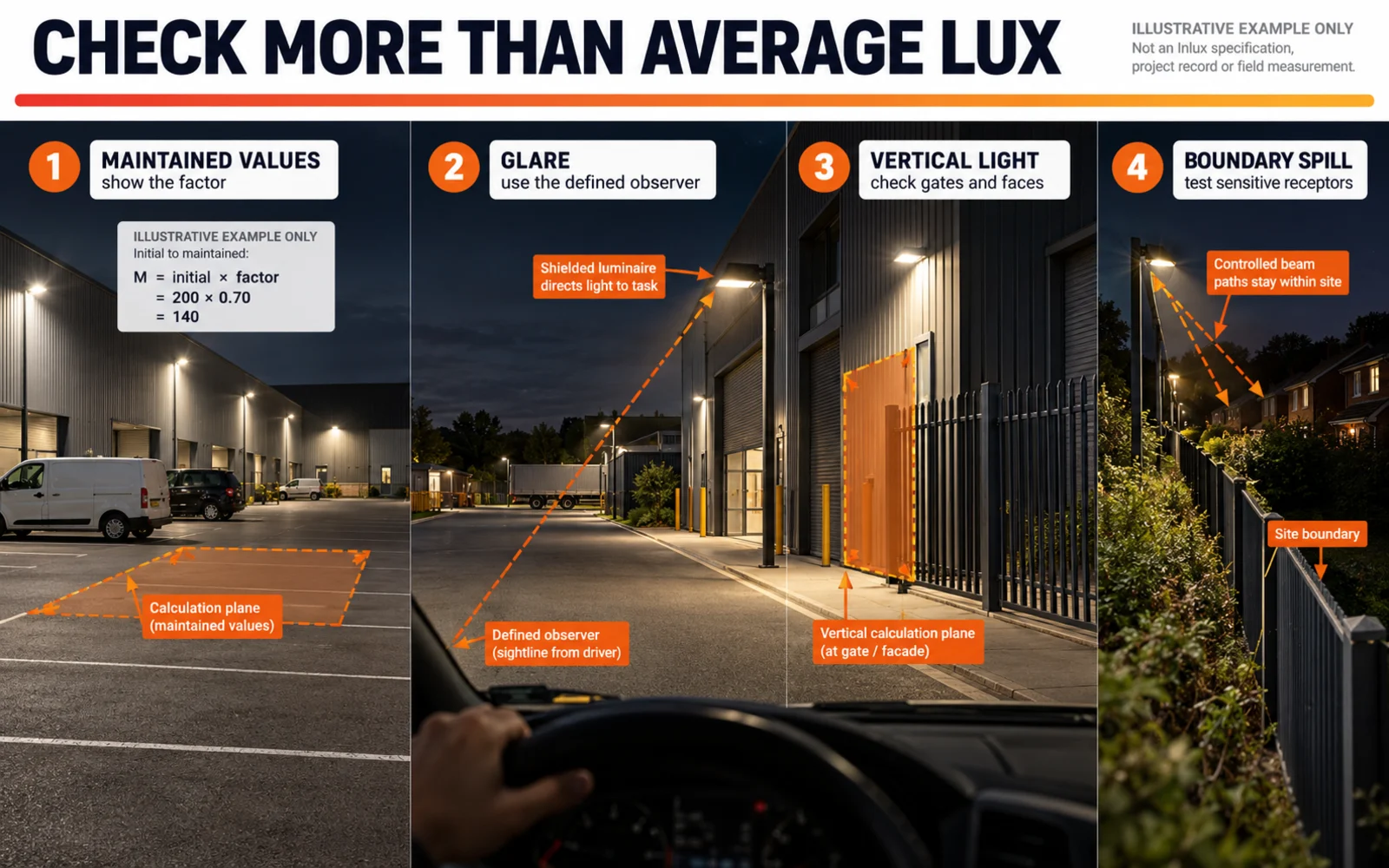
Initial versus maintained values
Initial values describe the model before depreciation and dirt assumptions are applied. Maintained values apply a stated maintenance factor. If an initial average is 24 lux and the maintenance factor is 0.80, the maintained average is 24 × 0.80 = 19.2 lux, assuming the software applies that factor consistently. The factor must be visible so bidders do not use different hidden margins.
Glare
Glare depends on source intensity, location, observer position, adaptation and background conditions. It cannot be judged reliably from average lux. For road lighting, threshold increment may be specified; for other outdoor areas, a relevant glare metric or controlled observer check may apply. The CIE distinguishes disability and discomfort glare and describes separate uniformity measures in its publication on glare and uniformity in road lighting.
Vertical illuminance
Horizontal values on pavement do not show how much light reaches a person’s face, a gate sign or a camera target. Add vertical calculation planes at the correct position and orientation when recognition or surveillance is part of the task.
Boundary spill and obtrusive light
Add calculation points or vertical planes at the property line and sensitive windows. Show the operating scene and time condition. A scheme may illuminate the road adequately and still create unacceptable light trespass because of tilt, optic choice or poorly placed poles.
Ten-minute review workflow
Use this sequence before debating colours or fixture quantities.
- Match the drawing revision. Confirm dimensions, boundaries and north direction against the latest site plan.
- Read the design basis. Locate every criterion, calculation plane, maintenance assumption and operating scene.
- Match the luminaire. Compare model, watts, optic, CCT, output setting and file identity with the datasheet and test report.
- Check mounting geometry. Verify pole coordinates, height, outreach, setback, tilt and rotation.
- Inspect grid definitions. Look for convenient exclusions, coarse point spacing or the wrong surface height.
- Recalculate ratios. Divide average by minimum and maximum by minimum to confirm labels and arithmetic.
- Find the weakest points. Review dark patches, hot spots, road edges, crossings, gates and conflict areas.
- Review non-horizontal risks. Check glare, vertical planes, boundary spill and control scenes where relevant.
- Read assumptions and exclusions. Identify trees, parked vehicles, wall reflections, road-surface data or future obstructions not represented.
- Lock the approved schedule. Put the exact model and settings into the BOQ, purchase order and installation drawings.
Common red flags in a photometric plan
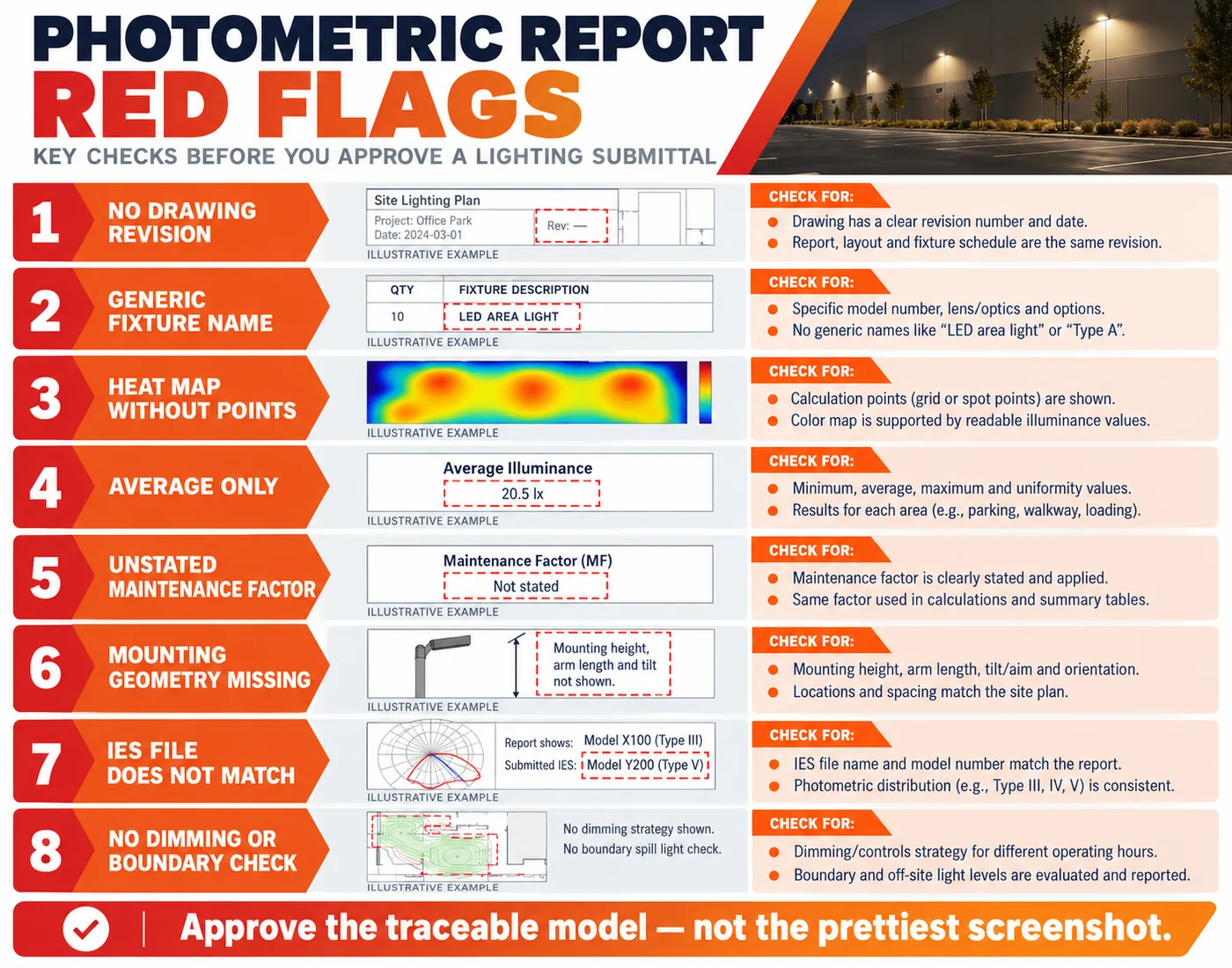
| Bandeira vermelha | Por que é importante | What to request |
|---|---|---|
| No scaled background or revision | The model may not match the current site | Dimensioned source drawing and revision history |
| Generic fixture name | Procurement cannot reproduce the calculation | Exact model, optic, watts, setting and file |
| Heat map without point results | Colours can hide the numerical minimum and grid boundary | Point-by-point table plus summary |
| Average only | Dark spots and high contrast remain invisible | Minimum, maximum and both defined uniformity ratios |
| Unstated maintenance factor | Initial and maintained results can be confused | Factor, basis and maintained result set |
| All poles shown at ideal locations | Civil, utility or boundary constraints may make the design unbuildable | Coordinated pole plan and conflict review |
| Tilt or rotation omitted | Asymmetric optics are sensitive to orientation | Aiming schedule and luminaire symbols |
| IES file name differs from tested model | The study may use borrowed or outdated data | Matching LM-79/report identity and file revision |
| Solar dimming scene omitted | The brightest scene may not represent most of the night | Separate calculations for each required output state |
| No boundary or vertical checks | Spill, cameras and pedestrian tasks may be untested | Relevant vertical planes and receptor points |
Do not reject a report only because it uses a different visual style or software. Reject or revise it when the calculation cannot be tied to the site, product, criteria and operating condition.
Worked example: choosing between two layouts
Consider a fictional 120 m × 24 m logistics access road with two vehicle gates and a residential boundary along one side. The project team asks two suppliers for a design. Both proposals report 20 lux average, but the plans are not equivalent.
| Review item | Proposal A | Proposal B |
|---|---|---|
| Average / minimum / maximum | 20 / 3 / 54 lux | 20 / 7 / 36 lux |
| Average-to-minimum | 6.67:1 | 2.86:1 |
| Exact optic stated | No | Sim |
| Vertical planes at gates | No | Sim |
| Residential boundary check | No | Sim |
| Output scenes | 100% only | 100%, scheduled dim and sensor boost |
| IES identity tied to report | Unclear | Model, optic, watts and file revision listed |
Proposal A cannot be approved from its average value. It has a lower minimum, greater contrast and missing traceability. Proposal B gives the reviewer enough information to test suitability, but it still must be compared with the real contractual limits and a separate solar energy calculation.
The lesson is not that a specific ratio is always acceptable. The lesson is that identical averages can conceal very different risk. A photometric plan earns approval through traceability and fit, not through one large number on the cover.
From approved model to installed result
The approved schedule should travel into procurement, construction and commissioning. Otherwise value engineering can silently replace the optic, driver current, tilt or mounting height that created the result.
Before shipment or installation, verify:
- model, wattage, optic and CCT against the approved schedule;
- IES/LDT filename or report identity against the approved file;
- pole and bracket dimensions against the layout;
- controller scenes and dimming times against the model;
- quantity and pole coordinates against the issued drawing.
After installation, inspect the site at night under a recorded operating state. Confirm mounting height, tilt, rotation, obstructions and control status before taking readings. Our solar street-light acceptance-testing guide covers field checks for lux, uniformity and glare. If the field result differs, first compare installed conditions with the model rather than immediately blaming the calculation or meter.
RFQ checklist for an accurate lighting plan
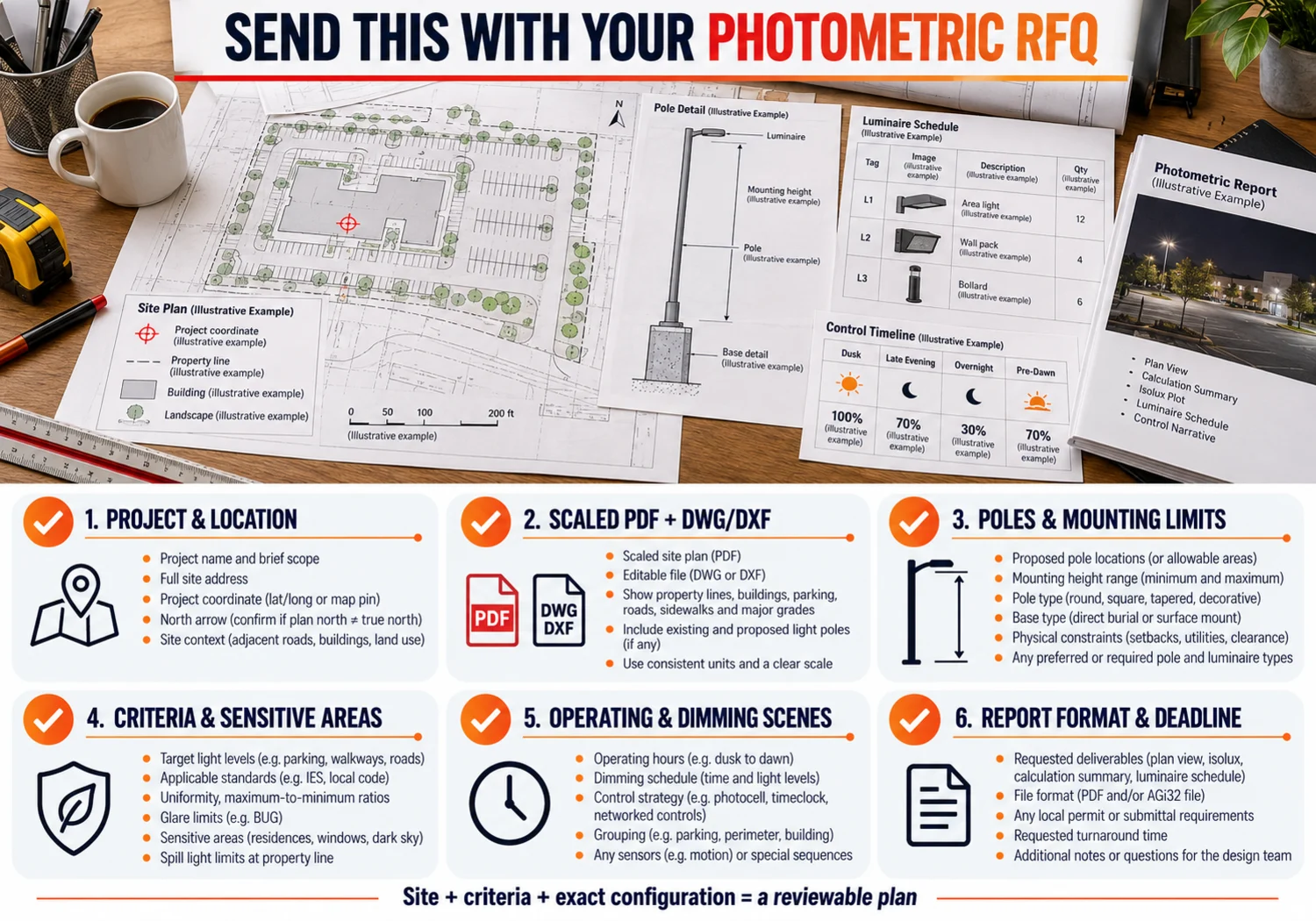
Send the following information with the enquiry:
- project name, country, coordinates and approval authority;
- current scaled plan in PDF plus DWG/DXF where available;
- road, parking, path, yard and boundary dimensions;
- existing or permitted pole coordinates and mounting limits;
- target criteria, metric definitions and maintenance basis;
- task areas, crossings, gates, camera views and sensitive receptors;
- operating hours, dimming scenes and sensor logic;
- preferred luminaire family, CCT or material restrictions;
- wind, corrosion, temperature and installation constraints;
- required report format, drawing revision and submission date.
For a parking application, the commercial solar parking-lot page shows how layout, energy and BOM support fit together. For roadway geometry and design variables, see the street-light design guide and the practical implications of Type III light distribution. Compare commercial solar street-light architectures or the all-in-one model collection once the layout and energy assumptions are defined.
Inlux Solar has delivered more than 300,000 lighting units across 60+ countries. That experience does not make a generic layout valid everywhere; it reinforces why location, geometry, operating schedule and acceptance requirements should be documented before equipment is selected. Use the solar street-light procurement checklist to carry the approved technical basis into supplier comparison.
If you need a site-specific calculation, send the plan, criteria, pole constraints and operating profile through the Inlux Solar project enquiry page. Ask for the exact luminaire schedule, photometric file identity, calculation assumptions, result tables and revision number with the proposal.
Perguntas frequentes
Is a photometric plan the same as an IES file?
No. An IES file contains angular light-distribution data for a luminaire configuration. A photometric plan places that data into a site model with poles, aiming, surfaces, grids and criteria. One file can be tested in many layouts, and one layout may compare several files.
What software is used to create a photometric plan?
Lighting designers use applications such as DIALux, AGi32 and other validated calculation tools. Software choice alone does not make a study correct. The site geometry, calculation method, exact files, assumptions and reviewer checks determine whether the output is useful.
How long does a photometric study take?
Timing depends on drawing quality, site complexity, number of design revisions and whether criteria are already agreed. A clean scaled plan with confirmed pole constraints and a complete design brief is faster to model than a screenshot that requires dimensions and requirements to be reconstructed.
Can wattage or lumens determine pole spacing?
No. Wattage is electrical input and lumens are total visible output. Pole spacing also depends on mounting height, optic distribution, road or area width, setbacks, tilt, target values, uniformity, glare and boundary constraints. Use a site calculation rather than a wattage-only spacing table.
Should a solar lighting plan show dimming modes?
Yes, when output changes during the night. Calculate the required scenes separately and state which scene is used for compliance. Then verify the energy schedule with the panel, battery, controller and worst-month solar sizing. Optical and energy calculations answer connected but different questions.
How do I know whether a photometric report is trustworthy?
Check whether the report identifies the site revision, criteria, calculation surfaces, exact luminaire and photometric file, mounting geometry, operating scenes, maintenance assumptions and point-by-point results. Recalculate the uniformity ratios and make sure the approved model, BOQ and installed equipment match.