






Field Story (why this matters)
A site looks perfect during commissioning. Then a cloudy week hits. A few solar street lights go dark and won’t recover, even when the sun returns. The team assumes “battery is dead,” but in many cases it’s the BMS protection mode doing its job—cutting off the pack to prevent cell damage. The difference between a quick recovery and a months-long dispute is whether you understand what triggered the protection and whether your tender/commissioning process collected the right evidence.
Quick Takeaways (TL;DR)
- BMS protection mode is usually triggered by over-discharge, over-current/short, temperature limits, or charging faults—not “random failure.”
- Most “dead” packs recover with a safe reset workflow: isolate load → confirm temperature window → apply correct charge source → verify charging → restore normal operation.
- Cold weather can block charging. Many LiFePO4 systems only allow charging above a minimum temperature—don’t force it.
- Repeat BMS cutoffs usually indicate sizing failure (SOC walk-down), wrong dimming profile, poor PV orientation, or commissioning gaps.
- Make it procurement-safe: require usable Wh, BMS thresholds, low-temp charge cutoff, event logs, and handover evidence photos.
Start here (internal): Common Failure Modes (Guide) · RFQ/BOQ Tender Checklist · Installation & Commissioning Checklist · Solar Street Light Buyer’s Guide Hub · Free Tender Pack (Project Input Sheet) · vendor due-diligence checklist
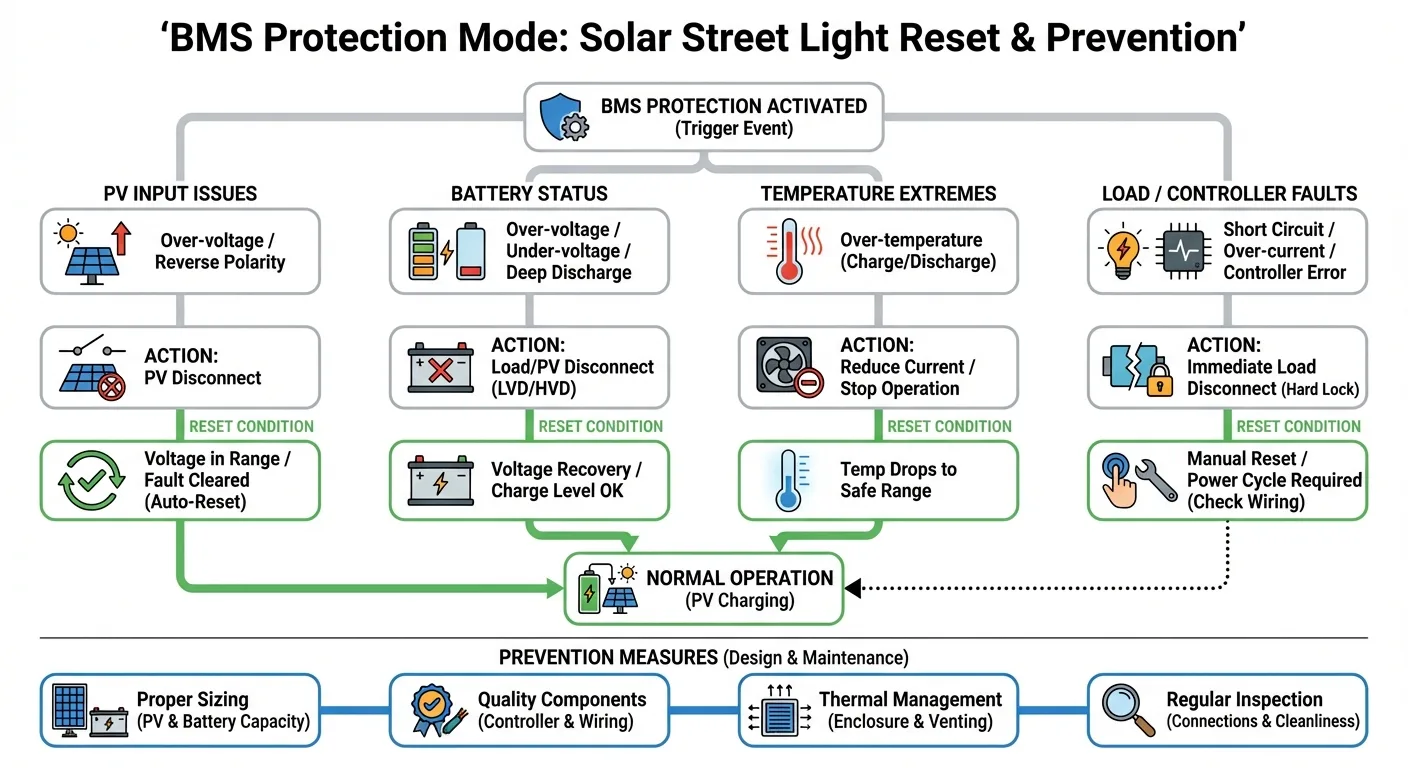
Figure — Decision Tree (BMS Protection Mode)
What “BMS Protection Mode” Means in Solar Street Lighting
A Battery Management System (BMS) protects LiFePO4 cells from conditions that shorten life or create safety risks. When a threshold is crossed, the BMS can disconnect charge and/or discharge paths—making the battery appear “dead.”
In solar street lights, protection triggers are commonly linked to real project conditions: long cloudy stretches, wrong dimming profile, undersized PV, poor panel orientation, cold nights, water ingress, damaged harnesses, or accidental short circuits during maintenance.
If you want a system-level refresher on energy flow (PV → controller/MPPT → LiFePO4 → LED driver/logic), start here: How Solar Street Light Works. For practical troubleshooting that overlaps with BMS symptoms, see: How to Fix Solar Lights.
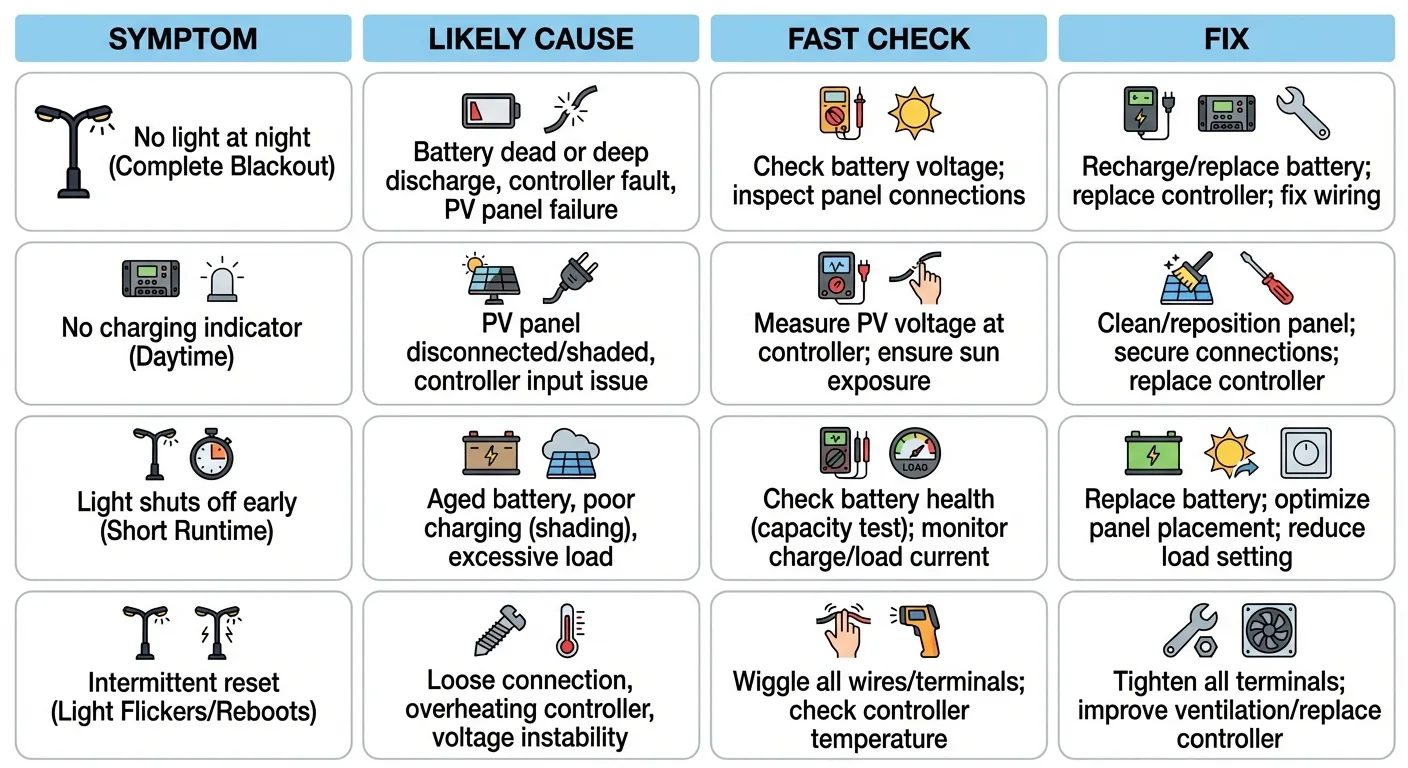
Figure 1 — Symptom → Cause → Fix (Fast Triage Matrix)
Typical field symptoms
- No light at night + daylight indicator normal → likely control logic, sensor, or dimming profile issue.
- No charging indicator even in sun → could be PV wiring/polarity, controller fault, or BMS blocking charge (temperature/lockout).
- Light works 1–2 hours then off → classic SOC walk-down / undersizing / high load vs promised profile.
- Intermittent resets → loose harness, water ingress, connector corrosion, short bursts of over-current.
The 6 Triggers That Most Commonly Send Solar Lights Into BMS Protection
1) Over-discharge (the #1 “dead system” cause after cloudy weeks)
When usable energy is consumed faster than it can be replenished, the battery state-of-charge (SOC) “walks down” day by day until the BMS cuts off discharge to protect cells.
Figure 2 — SOC Walk-Down (Worst-Month Sizing Fail)
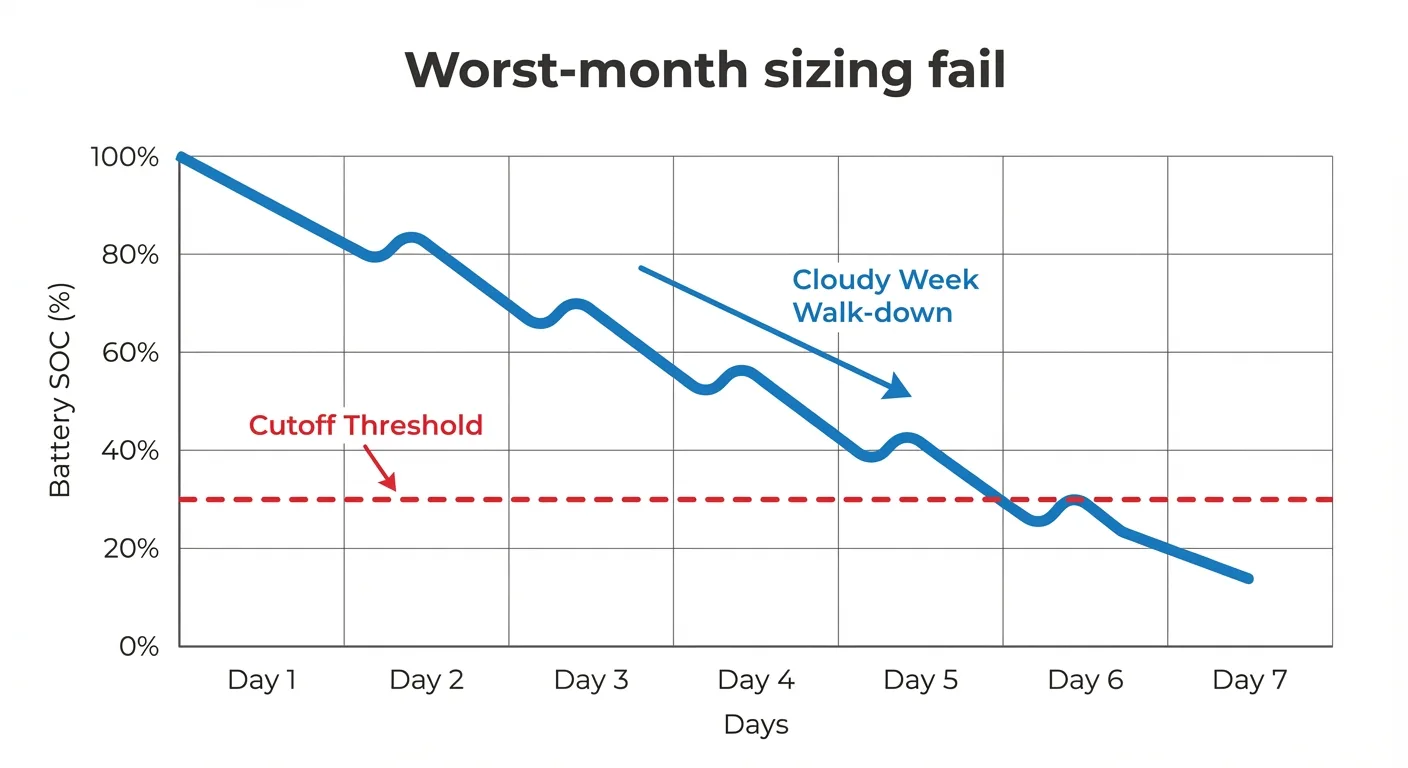
Tender fix: require an auditable energy budget + worst-month sanity check. Use: RFQ/BOQ Must-Haves.
2) Low temperature charging cutoff
Many LiFePO4 systems restrict charging below a minimum temperature to prevent damage. If charging is blocked, the system may not recover even when sunlight returns—until the battery warms into an allowed charging window.
Figure 3 — Low-Temp Charge Cutoff (What it looks like)
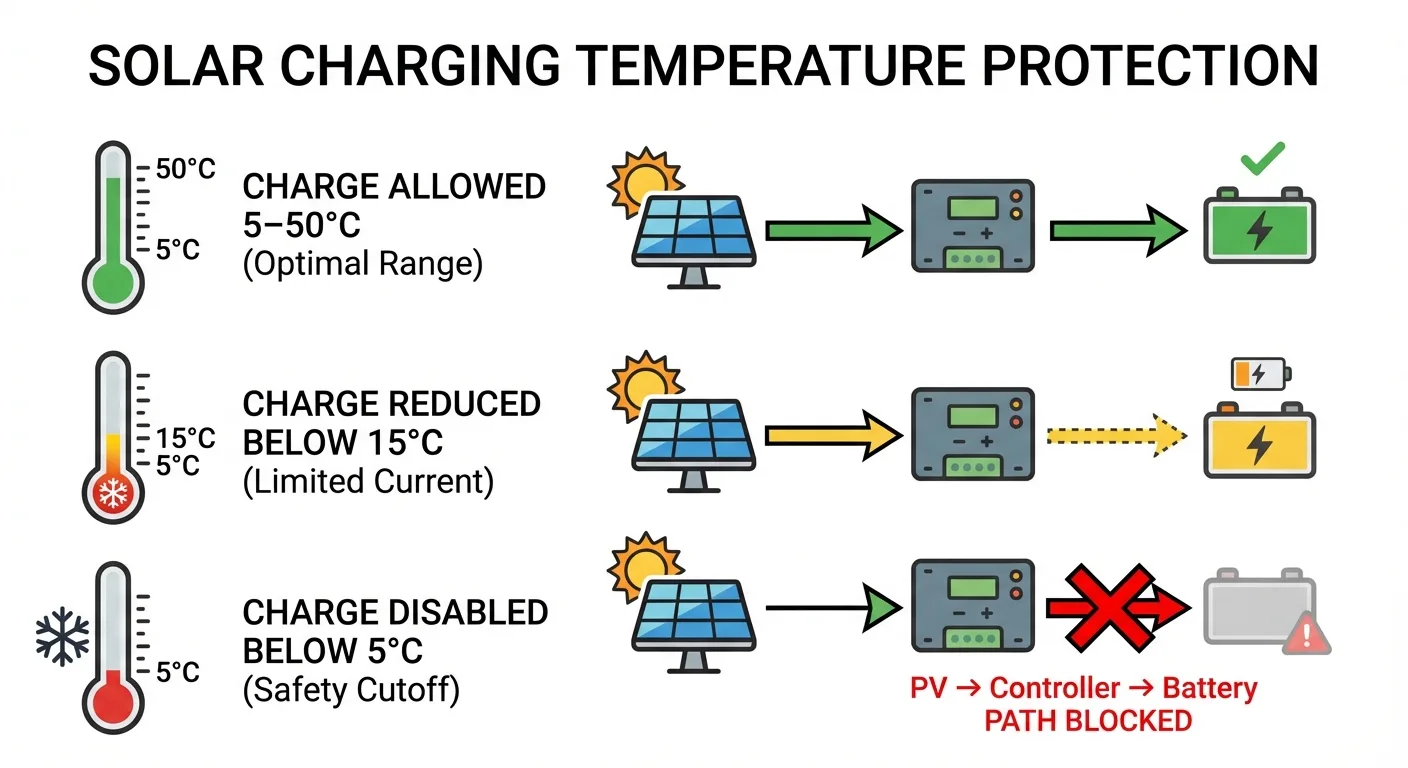
External references: Victron: Lithium battery operating temperature limits · Battery University: Charging lithium guidelines · Battery University: High/low temperature charging
3) Over-current / short circuit events
Pinched cables, incorrect polarity, water ingress, or connector damage can cause short bursts of current that trip BMS protection. These are often installation and cable-management issues—use the handover checklist: Installation & Commissioning Checklist.
4) Charger/controller fault or wrong wiring
If PV input isn’t reaching the controller, or the controller output isn’t reaching the pack, the system cannot recover. Always verify the simplest items first: PV cleanliness/orientation, connector seating, polarity, and visible damage. Related: Do Solar Lights Need Direct Sunlight?
5) Cell imbalance / protection threshold drift
Aging cells, repeated deep discharge, and heat stress can increase imbalance. The BMS may trip earlier to protect the weakest cell group. Prevention is cheaper than recovery: keep SOC out of the “bottom zone” via correct sizing and dimming profiles. Buyer reference: LiFePO4 Battery Lifespan (Buyer Guide).
6) Water ingress and corrosion (the silent accelerant)
Water ingress can turn occasional surge/current events into persistent faults. That’s why commissioning evidence should include cable glands, sealing, and enclosure photos. Start from: Commissioning Checklist.
Safe Reset Workflow (Solar Street Light Projects)
Figure 4 — Safe Reset Flow (Do / Don’t)
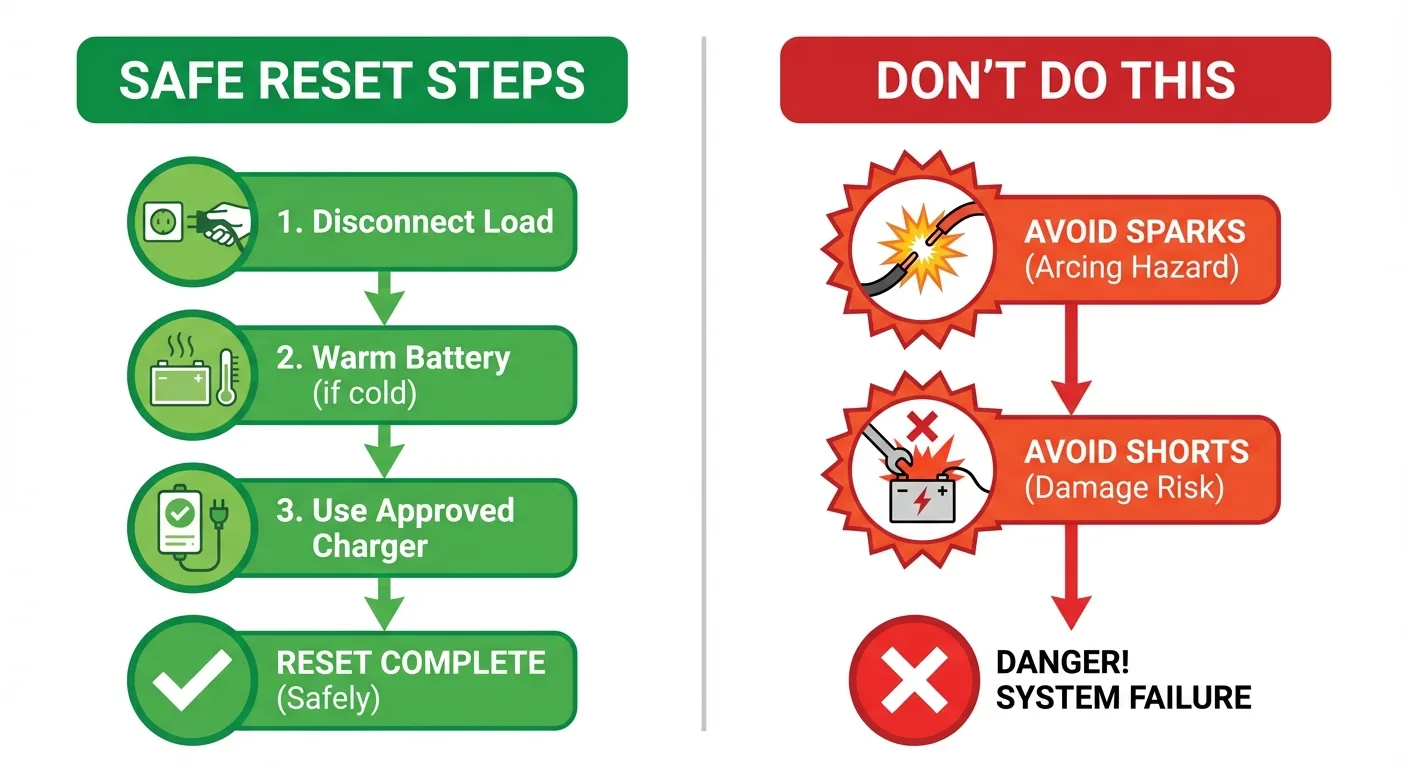
Important safety note: Do not open sealed battery packs or bypass protection hardware. If the project requires electrical work beyond normal commissioning checks, use qualified technicians.
Step 1 — Confirm temperature is within the allowed charging window
- If the battery is cold, let it warm naturally (or use approved enclosure heating if present) before attempting recovery.
- Do not attempt charging below the minimum threshold recommended by the battery/BMS design.
Step 2 — Isolate loads and remove “parasitic drains”
- Disconnect the lighting load/driver input if your architecture allows safe isolation.
- Leave the system isolated for a short period so the BMS can exit certain latch states (depends on design).
Step 3 — Apply the correct charge source (PV first, approved charger if specified)
- Ensure PV connectors are seated, polarity is correct, and the panel is clean and oriented correctly.
- If your system includes an approved service charger procedure, follow it exactly (avoid improvised supplies).
Step 4 — Verify charging behavior and only then restore the load
- Look for stable charging indicators/logs (depending on controller).
- Restore the load after the pack voltage/SOC is safely above cutoff.
Step 5 — If “dead-battery” recovery is required, treat it as a controlled safety case
When a pack is deeply discharged, safe pre-charge behavior and charger protections matter. This TI brief explains why “dead battery charging” requires correct protection logic: Texas Instruments: Dead Battery Charging Safety.
After recovery, document the event (date, weather, SOC behavior, dimming profile). If this happens repeatedly, it’s almost never “bad luck”— it’s an assumptions problem. Use the failure-mode guide as a checklist: Common Failure Modes.
How to Prevent Repeat BMS Cutoffs (Procurement + Commissioning Controls)
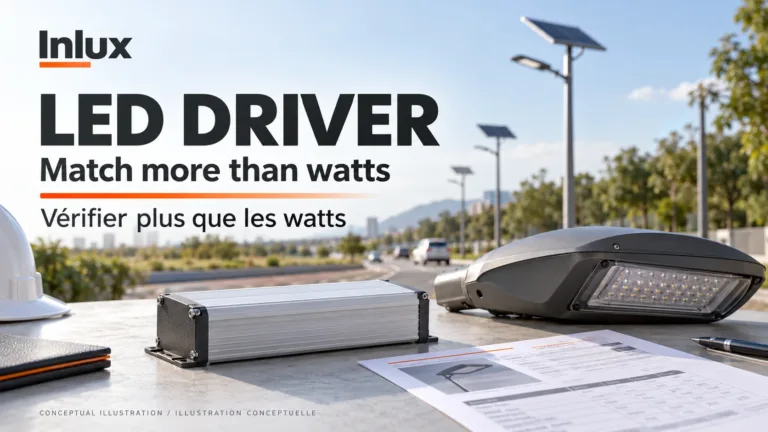
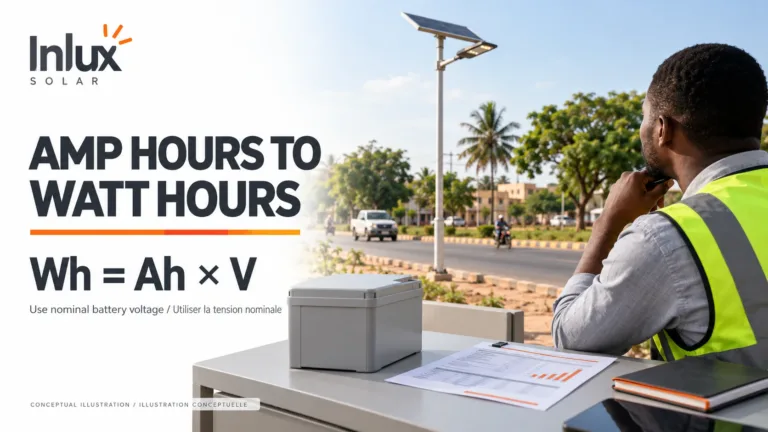
1) Stop undersizing: require usable Wh, not marketing watts
- Require an energy budget sheet (Wavg and Wh/night) tied to a declared dimming profile.
- Require a worst-month recharge sanity check to prevent SOC walk-down.
- Require declared usable energy factor (not just nameplate capacity).
Use: RFQ/BOQ Must-Haves and Project Input Sheet.
2) Commission like you mean it (photos + serial mapping + settings record)
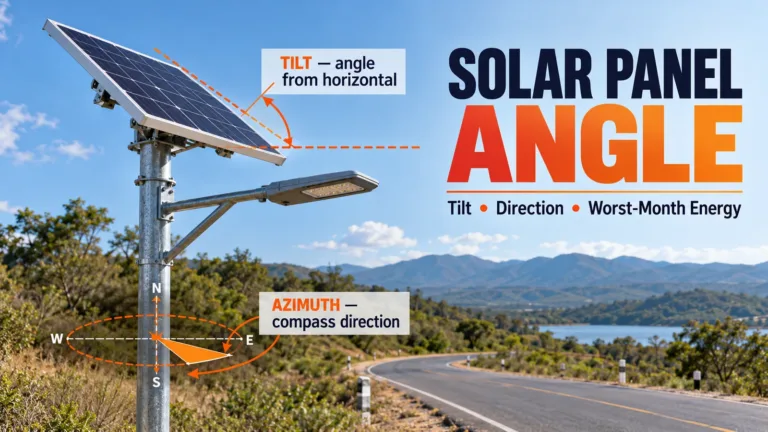
- PV orientation, tilt, shading check
- Serial-to-pole mapping
- Dimming profile and sensor settings recorded
- Sealing/cable gland evidence photos
Handover-ready checklist: Installation & Commissioning Checklist.
3) Include a clear warranty scope by component
Repeat cutoffs create arguments: “battery problem” vs “sizing/installation problem.” Avoid this by defining scope and evidence requirements in the tender. Start from: Buyer’s Guide Hub.
Figure 5 — Tender + Acceptance Evidence Checklist (Copy/Paste)
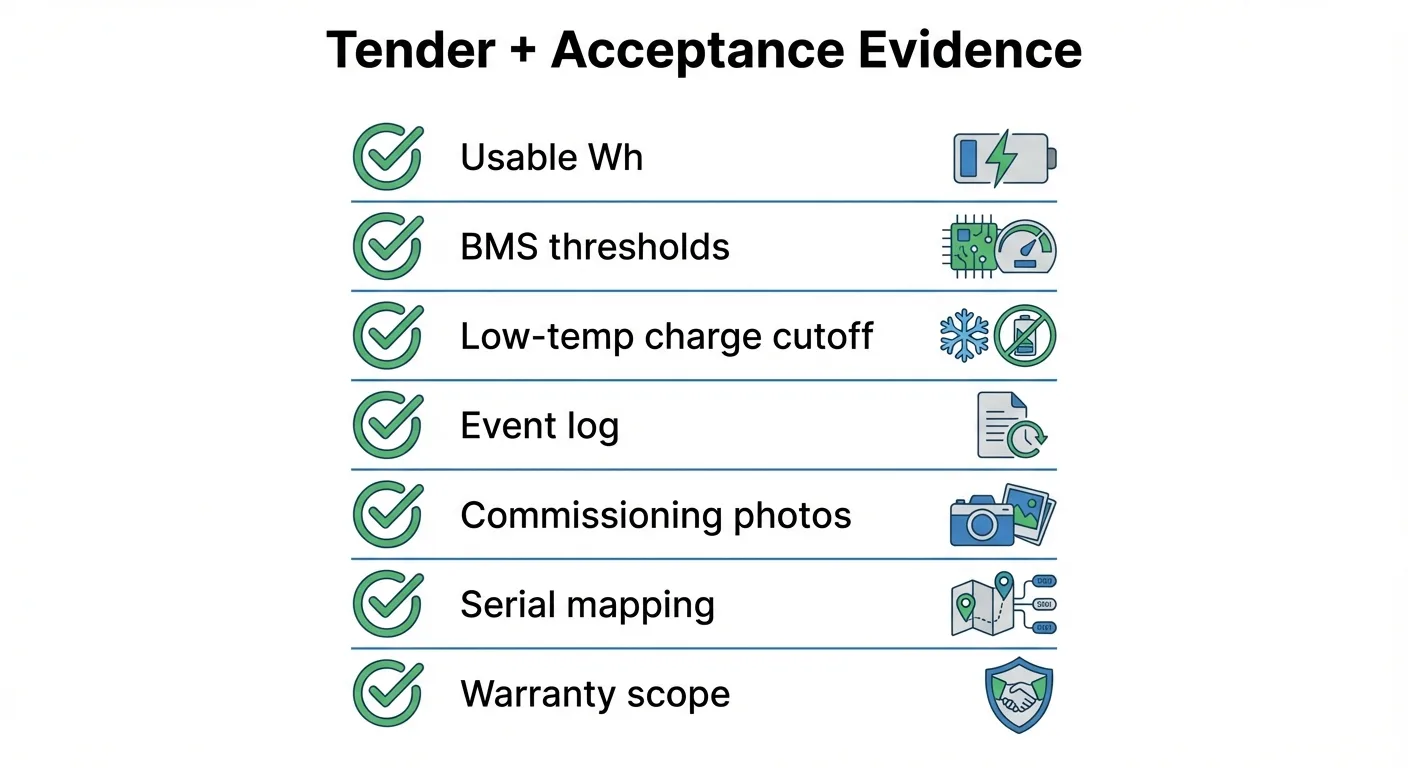
Copy/paste tender clause:
“Bidder shall declare usable energy (Wh) and the assumptions used (dimming profile, hours, worst-month recharge sanity check). Bidder shall provide BMS protection thresholds (over-discharge, over-current, temperature cutoffs) and the low-temperature charging policy. Bidder shall provide commissioning evidence: serial mapping, settings record, PV orientation photos, sealing/cable gland photos, and acceptance checklist.”
If you also need product context links for bidders, point them to your category and model pages: All-in-One Solar Street Lights · SIRIUS Series · GALAXY Series
FAQ (Project & Operations)
What is BMS protection mode?
BMS protection mode is when the battery management system disconnects charge/discharge paths to protect cells from unsafe voltage, current, or temperature.
Why does the battery look “dead” after cloudy days?
Often it’s over-discharge cutoff after SOC walk-down. It indicates sizing/assumptions failure, not a random defect.
Can cold weather prevent charging?
Yes. Many LiFePO4 systems restrict charging below a minimum temperature. Let the battery warm before attempting recovery.
What’s the fastest safe recovery workflow?
Confirm temperature window → isolate loads → verify PV wiring/polarity → apply approved charging source → confirm charging → restore load.
Should I open the battery pack to “reset” it?
No. Do not open sealed packs or bypass protection hardware. Use approved service procedures and qualified technicians.
Why do some lights shut off early at night?
Common causes: wrong dimming profile, undersizing, degraded battery, or rising internal resistance at low temperature.
How do I prevent repeat cutoffs in tenders?
Require usable Wh, energy budget sheet, worst-month recharge sanity check, and declared BMS thresholds + evidence pack.
What commissioning records matter most?
Serial mapping, PV orientation/shading photos, dimming settings record, sealing/cable gland photos, and acceptance checklist.
Is BMS cutoff a “battery defect”?
Not necessarily. It’s often a protection response to an energy or installation issue. Use failure-mode diagnosis before replacement.
Where can I standardize all this for bidders?
Use the hubs: RFQ/BOQ Checklist and Commissioning Checklist.
What’s “usable energy factor” and why should I ask for it?
It’s the usable portion of nameplate capacity after safety margins and cutoff thresholds. It determines real runtime and recovery resilience.
Why does the system not recover immediately when sun returns?
Charging may be blocked by low temperature, wiring faults, controller faults, or the pack may require a controlled recovery procedure.
Can shading cause BMS protection events?
Yes. Persistent partial shading reduces daily harvest and causes SOC walk-down. Confirm site shading early.
What’s the difference between controller protection and BMS protection?
Controller manages charging/lighting logic; BMS protects cells. A “dead” system can be triggered by either—triage is required.
What should I require for warranty clarity?
Define component warranty scope and evidence responsibilities (battery+BMS vs installation vs sizing assumptions).
How do I spot “undersized by marketing” systems quickly?
If the bid lacks auditable Wh/night + worst-month check, it’s not comparable. Require the evidence pack.
Should I demand event logs or remote monitoring?
For large projects, yes. It reduces disputes and shortens downtime by making cutoffs diagnosable.